Manage your triathlon volunteers
Three disciplines, two transitions, and water safety that cannot be improvised: a triathlon needs to know not only how many volunteers, but which ones.
Three races inside one race
The swim ties up boats and water safety for an hour; the transition area is staffed from dawn to the last return; the bike course needs marshals at every junction, and the run moves them all somewhere else. Head counts follow one another instead of adding up.
Each phase becomes a position with its own hours, and the requirement is declared hour by hour: the only way to see that the transition area is thin while everyone is on the swim. See teams and positions.
Posts that require a qualification
Lifeguard, boat pilot, qualified official, first-aider: these are not filled by the first person who volunteers. Add the question to the sign-up form (qualification, licence, experience), and the answer arrives with the application, in the list, filterable. You assign knowing what you have instead of asking again by email.
Transitions, where everything happens in fifteen minutes
A transition area needs a lot of people in a very short window, then nobody. Short, back-to-back shifts are exactly what a spreadsheet handles badly and what the tool shows plainly: the fill table shows the gap before it costs a penalty.
And if you would rather let volunteers place themselves, shift booking shows them the remaining places, with substitutes and a waiting list.
Every team has its own lead
The event is split into teams: bar, welcome desk, security, set-up, shuttles. Each one goes to one or more leads, who create their own positions and assign their own volunteers without access to the rest of the organisation.
This page gives the filling rate of every team, and one click takes you down into the one that is stuck. You have nobody to ask to know where the event stands.
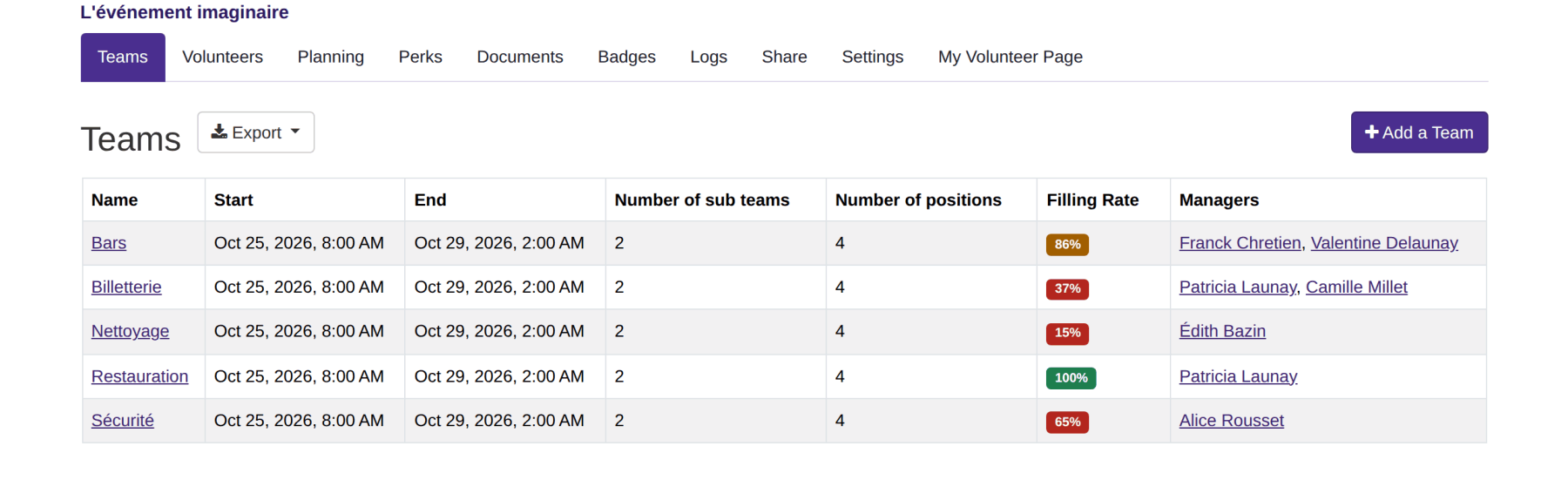
A position is a dated assignment
Inside a team, a position says what has to be done and between which hours: the Saturday bar, from 8am to 2am. A team splits into sub-teams where it needs to, by site or by day, each with its own leads.
The next edition is created from this one, with its teams, its positions, their hours and their requirements. You adjust what changed, the rest is already there.
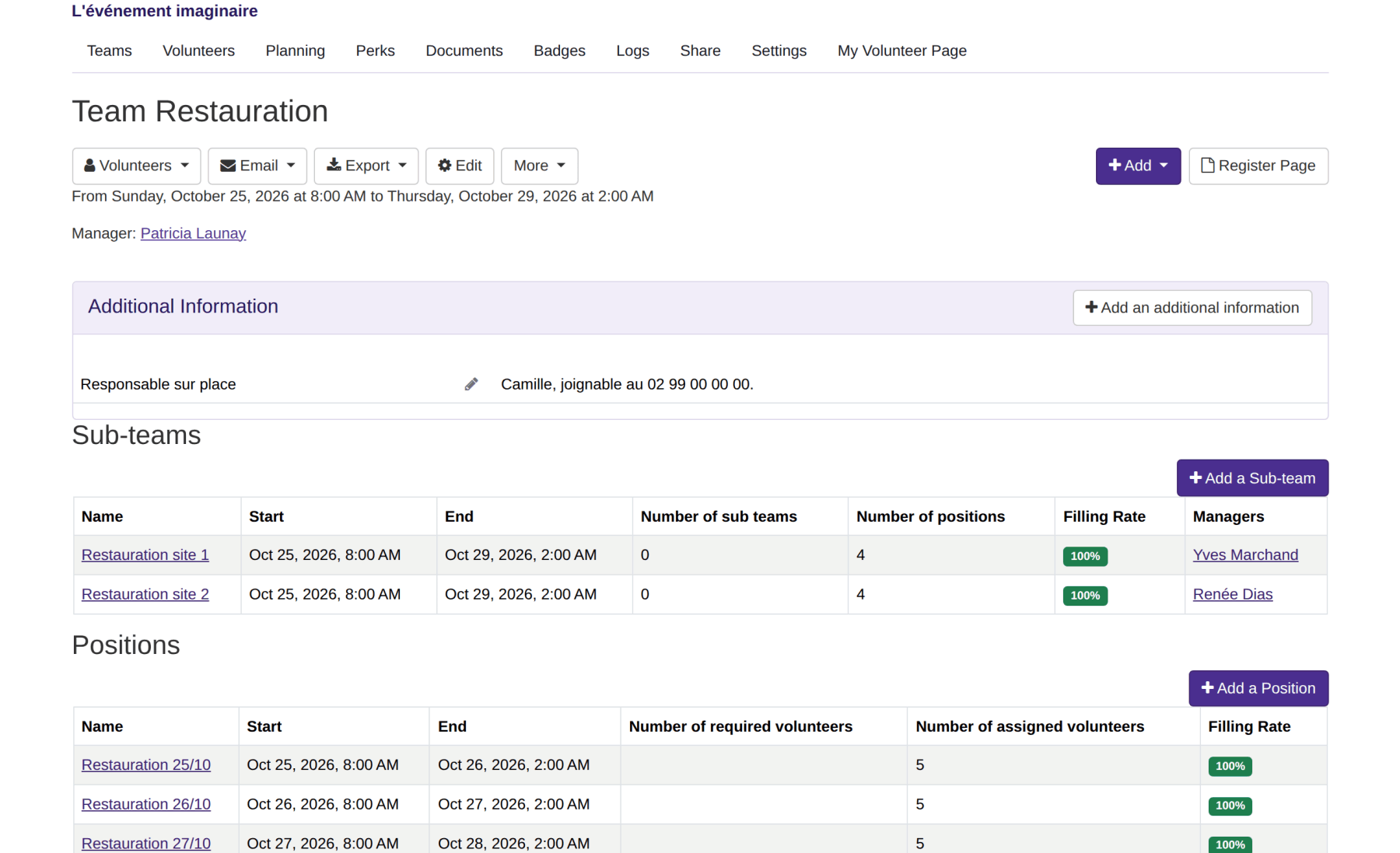
Requirements are declared hour by hour
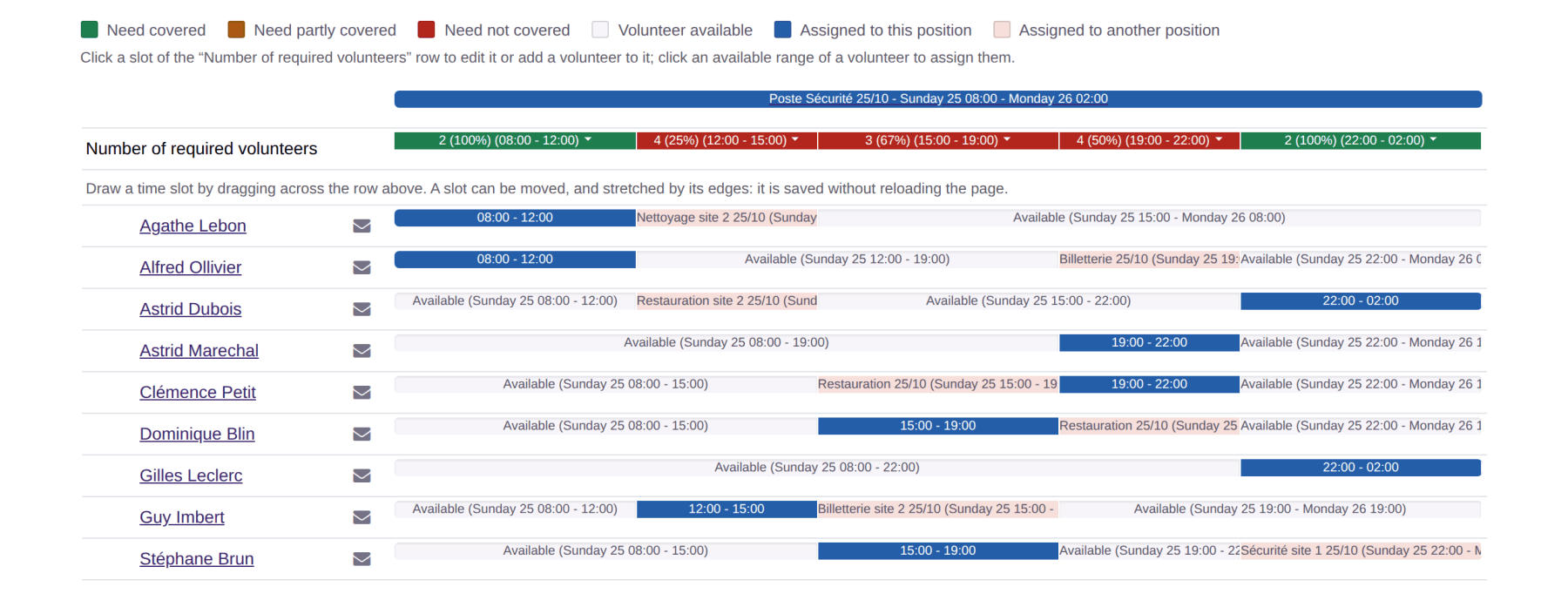
A position does not need the same headcount all day: two people from 8am to noon, four from noon to 3pm. The filling rate is read on those bands, and that is where a gap shows up while there is still time to fill it.
Opposite, every volunteer shows the availability they declared and the positions they already hold. An assignment that contradicts them is refused, every time, without you having to think about it.
Features
Volunteer registration
One public link, a QR code and a form that asks your own questions: applications arrive already sorted by preferred team and by availability.
Volunteer import and export
Bring your list in from a spreadsheet, as CSV or Excel, and take your volunteers, schedules and their answers back out whenever you want.
Volunteer tracking
Filter by status, team, availability or assigned position, choose your columns, and find each volunteer's full history.
Teams and positions
Split the event into teams and positions, hand each team to its lead, and say how many volunteers you need, hour by hour.
Volunteer scheduling
Assign people without ever creating a clash, follow staffing position by position, and send everyone their own schedule.
Shift booking
Let volunteers pick their own shifts, with substitutes and a waiting list, while you keep control of confirmation.
The volunteer's account
Every volunteer has their own page: their next shift, their hours, their documents, their perks, and their calendar up to date on their phone.
Emails to volunteers
Write in two clicks to a team, a position, unassigned volunteers or everyone, from reusable templates.
Documents and mail merge
Call-up letters, certificates, running sheets: one Word template, and one document per volunteer filled in with their details and schedule.
Badges and perks
Print badges with a photo and a QR code, and track the meals, drinks and t-shirts handed to each volunteer.
Attendance check-in
Record each volunteer arriving at their post and leaving it, by scanning their badge or from the shift page, and total the hours actually worked.
Volunteer groups
A partner organisation brings its own volunteers? Give it its own sign-up link and its own leads, without opening up the whole event.
A new edition every year
The new edition carries over teams, positions and hours shifted to the right dates, and last year's volunteers are invited back.
Volunteer data and GDPR
Hosted in France, a published processing agreement, and retention periods applied by code rather than merely announced.
Accessibility for volunteers
Measured screen by screen and published: 100% of the applicable RGAA 4.1 criteria, self-assessed, and a statement that also says what that does not cover.
Events of all sizes simplify their organisation with Volunteo

200 volunteers

600 volunteers

1000 volunteers

3000 volunteers
Frequently asked questions
Can volunteers be filtered by qualification?
Yes: the answers to your custom questions appear as columns in the volunteer list, which filters and exports.
How do we produce the list of officials for the federation?
The list of assigned volunteers exports to Excel or CSV, filtered by team or by position.
Our volunteers work several posts during the day.
That is the normal case: a volunteer can be assigned to several shifts, with the tool checking that they do not overlap and that they respect the declared availability.