
Teams and positions
An event cannot be run out of a single head. Volunteo splits it into teams, each handed to leads who work independently, and into positions, which say precisely what has to be done, where, when, and by how many people.
Teams: delegating without losing track
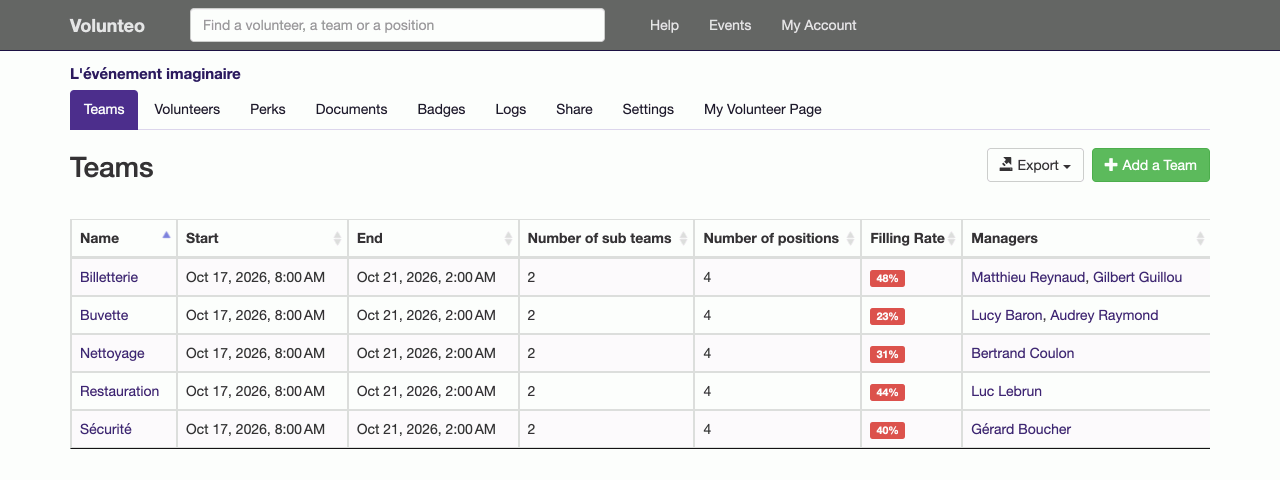
A team matches a part of the organisation: bar, welcome desk, security, set-up, shuttles, kitchen. You give it one or more leads, and they run their own patch: they create their positions, declare their needs, assign their volunteers. They only see their own teams.
You stay in charge of what they are allowed to do: accept volunteers, create them, edit availability. A large festival opens those rights wide; a charity that watches its headcount keeps them shut.
Teams can contain sub-teams. "Bar" splits into "Stage bar", "Campsite bar", "Washing up"; each sub-team has its own leads and its own fill rate, without multiplying top-level teams.
Positions: where, when, how many
Inside a team, a position is a dated assignment: "Stage bar, Friday 6pm-11pm", "Runner welcome, Sunday 7am-11am". A position carries a description, instructions, and its staffing needs per time range, and that last detail changes everything.
Because the number of volunteers required is almost never constant. A catering position needs six people from noon to 2pm and two from 2pm to 6pm. You say exactly that, range by range; the fill rate is computed on that basis rather than on an average that would hide the lunchtime gap.
Each position can carry its own illustrated instructions: the access map, a photo of the storeroom to open, how to run the till. The volunteer finds them on their page, with nobody to call.
Staffing at a glance
The teams view shows the fill percentage of each one. You immediately see which team is done and which one still needs people, and you drill down to the position that is short in one click. This is what replaces the weekly round-table: the information is there, current, without anyone having to compile it.
A "History" tab tracks the changes made by the other leads, who added whom, who removed what. On an event where six people organise in parallel, that is what prevents misunderstandings.
Positions that come back
For a regular activity (a Tuesday distribution, a Saturday morning shift), a position can be repeated. You describe one occurrence, you repeat it, and the following ones exist with the same times and the same needs. If the instructions change along the way, you apply them in one gesture to every occurrence still to come, leaving past ones untouched.
What it unlocks next
This structure underpins everything else: volunteers pick their teams when they sign up, assignments happen position by position, emails are targeted by team or by position, and call-up letters pick up everyone's own times automatically.
Frequently asked questions
Does a team lead see the whole event?
No. They see their own teams only: their positions, their staffing needs, their volunteers. On top of that you decide, team by team, whether they may accept volunteers, create them, and edit their availability.
Do I have to set everything up again each year?
No. A new edition starts from the previous one: teams, sub-teams, positions, hourly needs and instructions are all copied over. You adjust dates and numbers, you do not redraw the organisation.
What if the same position comes back every week?
A position can be repeated: you define the recurrence once, and the following occurrences are created with the same times and the same needs. A later change can be applied in one go to every occurrence still to come.
Read next
Volunteer scheduling
Assign people without ever creating a clash, follow staffing position by position, and send everyone their own schedule.
Shift booking
Let volunteers pick their own shifts, with substitutes and a waiting list, while you keep control of confirmation.
All features
- Volunteer registration
- Volunteer import and export
- Volunteer tracking
- Teams and positions
- Volunteer scheduling
- Shift booking
- The volunteer's account
- Emails to volunteers
- Documents and mail merge
- Badges and perks
- Attendance check-in
- Volunteer groups
- A new edition every year
- Volunteer data and GDPR
- Accessibility for volunteers