
Documents and mail merge
There is always paperwork left: the call-up letter with the access map, the certificate for an employer, the position sheet to pin up, the summary to hand to a lead. Volunteo builds them from your own Word templates, one per volunteer, with their information inside.
Your template, our data
You lay the document out in your word processor, with your logo and your design, and drop placeholders where an information should appear. On generation, each placeholder is replaced by the value for that volunteer:
- their identity and contact details: first name, surname, date of birth, address, phone, email;
- their teams and positions;
- their schedule, laid out, with the times of each of their assignments;
- the name and phone number of their team lead;
- the list of the other volunteers on the same position;
- the position's instructions, pictures included: access map, rigging diagram, how to run the till.
One template therefore serves a hundred volunteers and produces a hundred different documents, with no mail merge to build by hand and no spreadsheet in between.
Generating in bulk
A document can be downloaded volunteer by volunteer, but above all all at once: an archive holding one file per volunteer, ready to print or to attach. You can also ask for automatic conversion to PDF, for a document meant to be sent or displayed.
Who sees what
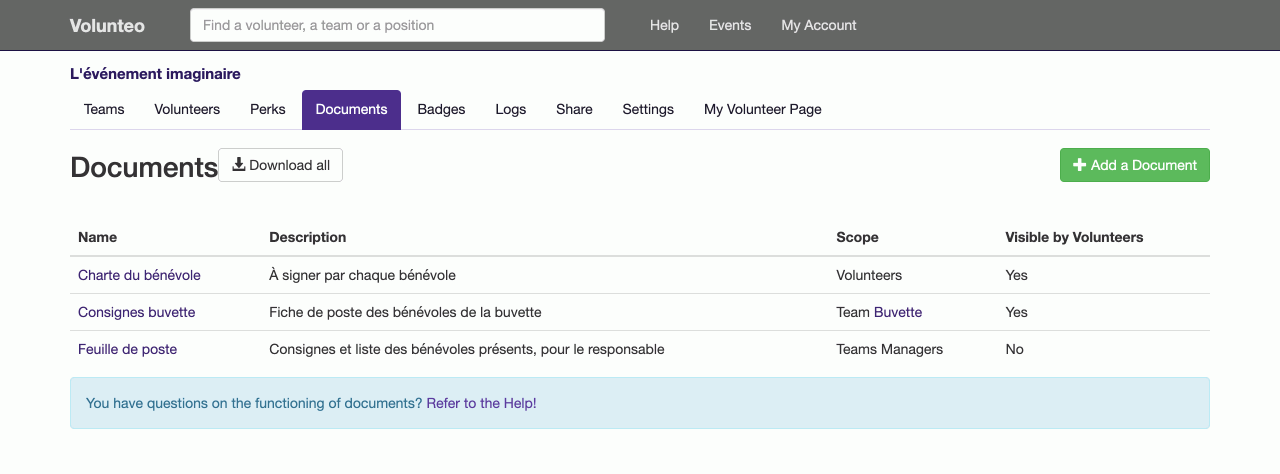
Every document has a scope: the whole event, one team, one position. And you choose whether it is visible to volunteers from their page: the call-up letter, yes; the leads' checklist, no. Volunteers then download their own copy whenever they need it, without asking you.
An event can also let volunteers upload files: insurance certificate, first aid diploma, parental consent. The documents you asked for at sign-up land in the same place as the rest of their file.
Badges are next door
A name badge with a photo and a QR code is not a Word document: it has its own workshop, described in badges and perks.
Frequently asked questions
What template format do I provide?
A Word document (.docx) laid out exactly as you like (logo, layout, signature) with placeholders where the variable parts go. You are not learning yet another editor: you start from the template you already have.
Can I get PDFs rather than Word files?
Yes. A document can be marked as "PDF download only": the conversion is done for you, and the volunteer receives a PDF they cannot alter by accident.
Do documents have to be generated one at a time?
No. One button produces the whole set at once, for every volunteer concerned, in a single archive to download. That is the difference between ten minutes and an evening.
Read next
Badges and perks
Print badges with a photo and a QR code, and track the meals, drinks and t-shirts handed to each volunteer.
Attendance check-in
Record each volunteer arriving at their post and leaving it, by scanning their badge or from the shift page, and total the hours actually worked.
All features
- Volunteer registration
- Volunteer import and export
- Volunteer tracking
- Teams and positions
- Volunteer scheduling
- Shift booking
- The volunteer's account
- Emails to volunteers
- Documents and mail merge
- Badges and perks
- Attendance check-in
- Volunteer groups
- A new edition every year
- Volunteer data and GDPR
- Accessibility for volunteers