
Badges and perks
On the day, two questions come back every ten minutes at the welcome desk and at the bar: who is this person? and are they still entitled to anything? The badge answers the first, perk tracking the second, and the QR code ties them together.
Badges in your own colours
You start from your own artwork (the event poster, sponsor logos, your colours), and place the variable parts wherever you want, at whatever size you want:
- the volunteer's photo, the one they uploaded when signing up;
- their full name;
- their team, so a lead can see at a glance who reports to whom;
- a personal QR code.
You set the badge dimensions and get a PDF ready to print. You can create several designs: one badge per team, a distinct one for leads and administrators, another for backstage access.
Perks, without a book of tokens
Meals, drinks, a t-shirt, a ticket for the evening show, a hamper at the end of the mission: these have to be counted, and nobody enjoys counting them. Volunteo keeps the ledger.
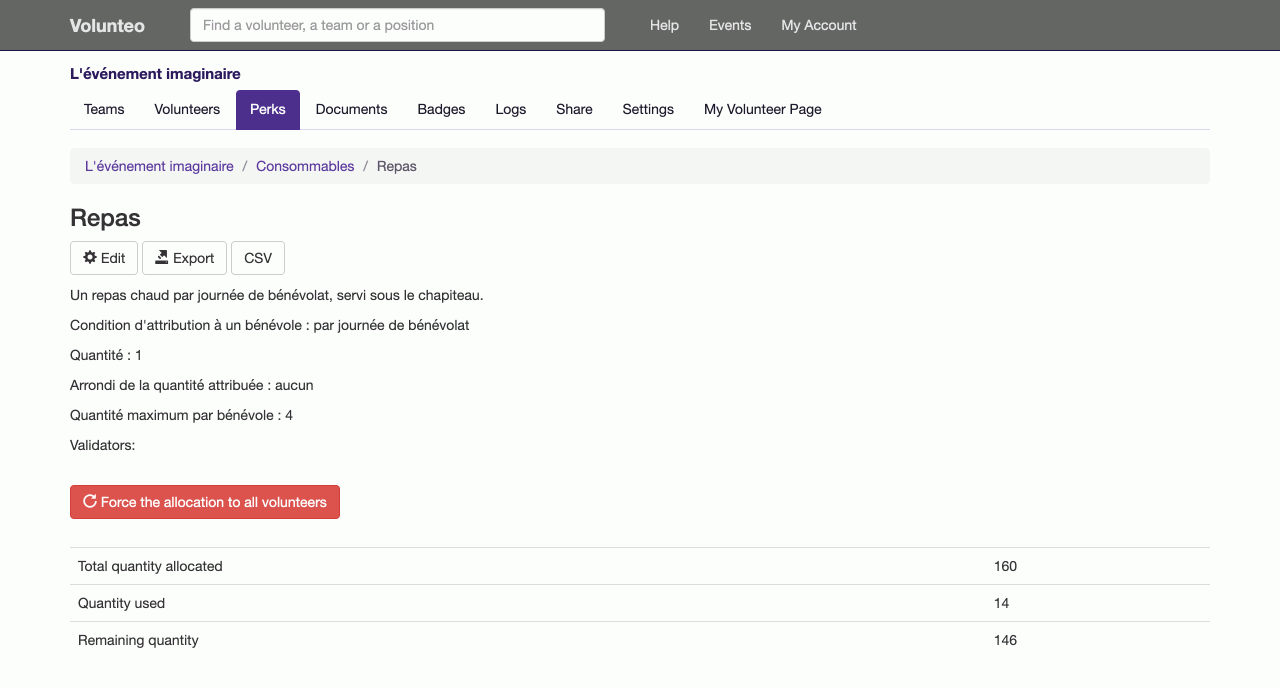
You declare a perk and the rule that grants it:
- a fixed number for every volunteer: a t-shirt, a ticket;
- per hour assigned: one drink every two hours;
- per day or per half-day volunteered: lunch, breakfast.
You choose the rounding, a cap per volunteer, and grant it to everyone in one go. Special cases (the person who did the set-up, the one who came three extra evenings) are corrected one by one.
Scanning at the bar
On the ground, the person in charge of a perk scans the badge QR code: the volunteer's page opens with their remaining entitlements, and they redeem what is handed over. No tokens to pre-cut, no cross-referenced lists in quadruplicate, no argument about what has already been taken.
Each perk has its own managers: only those you name can redeem. And the full state exports to a spreadsheet, for closing the books or for telling the caterer how many meals were actually served.
Why it matters
Perks are the least controlled part of a volunteer budget, and the most frequent source of friction with the teams. An announced rule, a tally kept in the same place as the schedule, and the question goes away: for you and for the volunteer, who sees their own entitlements on their page.
Frequently asked questions
What is the badge QR code for?
Scanning it with a phone opens the volunteer's perks page: what they are entitled to, what they have already taken, what is left. It replaces the book of drink tokens at the bar and the paper list at the canteen door.
Do meals have to be granted one by one?
No. A perk is computed from time volunteered (one meal per day, one drink per hour, a fixed number for everyone), and granted to every volunteer in one go. You then adjust the special cases.
Who can redeem a perk?
You name the people in charge of each perk: the bar manager for drinks, the catering team for meals. Only they redeem, and they immediately see whether anything is left for the volunteer in front of them.
Read next
Attendance check-in
Record each volunteer arriving at their post and leaving it, by scanning their badge or from the shift page, and total the hours actually worked.
Volunteer groups
A partner organisation brings its own volunteers? Give it its own sign-up link and its own leads, without opening up the whole event.
All features
- Volunteer registration
- Volunteer import and export
- Volunteer tracking
- Teams and positions
- Volunteer scheduling
- Shift booking
- The volunteer's account
- Emails to volunteers
- Documents and mail merge
- Badges and perks
- Attendance check-in
- Volunteer groups
- A new edition every year
- Volunteer data and GDPR
- Accessibility for volunteers