
Shift booking by volunteers
For a collection, a distribution, a weekly shift or a charity shop there is no schedule to compose: there are shifts to fill, and volunteers who know better than you when they can come. Volunteo hands them the pen, without taking it out of yours.
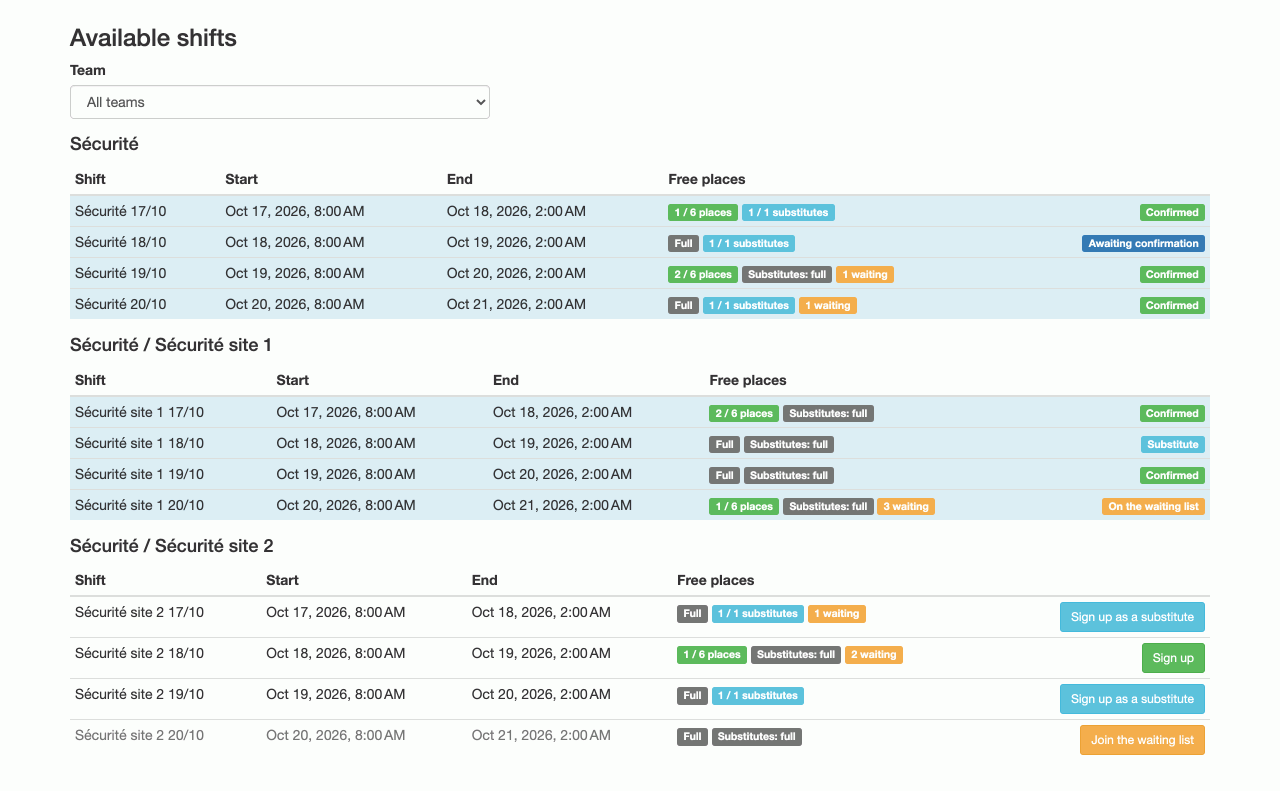
Volunteers choose, you keep the last word
Once the feature is on, sign-up ends with a Shifts step: team by team (or shop by shop, or branch by branch), the volunteer sees the positions of the teams they are interested in, with the places left, and signs up.
Two regimes, chosen in the event settings:
- Booking confirmed on the spot: the volunteer books, it is theirs. The smoothest option for a team that knows itself.
- Booking subject to confirmation: the booking becomes a request that a lead confirms or removes from the position page. The safest option when shifts are sensitive.
Either way the place is taken from the moment of booking: two volunteers cannot claim the same last place.
Substitutes and waiting list
Beyond its regular holders, a shift can plan for a number of substitutes. That answers the real problem of regular activity: there are always absences, and it is better to have anticipated them.
When regulars and substitutes are all taken, the waiting list, if you enable it: still lets volunteers put their hand up. They take no place, and are promoted automatically, in order of arrival, as soon as one frees up. Nobody has to watch the page.
What the volunteer sees next
Their page keeps access to their shifts: they see the status of each one (confirmed, awaiting confirmation, waiting list), cancel a request in one click, and take more while places remain. The commitment is explicit on both sides, with no email exchange.
What it changes for you
You stop being the compulsory middleman. Your job becomes: describe the shifts and their needs, watch the ones that stay thin, and chase where people are missing. The rest, who comes when, settles itself.
The feature is off by default and set per edition. An event that would rather assign volunteers itself never sees a trace of it.
Frequently asked questions
Does booking a shift accept the volunteer?
No, and that is deliberate. Booking a shift does not accept the volunteer onto the event: acceptance stays your decision, exactly as with a manual assignment. Shift capacity and volunteer acceptance remain two separate calls.
What happens when a shift is full?
Depending on your settings, the volunteer can sign up as a substitute if substitute places remain, or join the waiting list. A waiting-list entry takes no place; it is promoted automatically as soon as one frees up.
Does it have to be on for the whole event?
The setting is per edition, and it is off by default: until you switch it on, nothing changes for you or for your volunteers. You can therefore try it on one occasion and go back on the next.
Read next
The volunteer's account
Every volunteer has their own page: their next shift, their hours, their documents, their perks, and their calendar up to date on their phone.
Emails to volunteers
Write in two clicks to a team, a position, unassigned volunteers or everyone, from reusable templates.
All features
- Volunteer registration
- Volunteer import and export
- Volunteer tracking
- Teams and positions
- Volunteer scheduling
- Shift booking
- The volunteer's account
- Emails to volunteers
- Documents and mail merge
- Badges and perks
- Attendance check-in
- Volunteer groups
- A new edition every year
- Volunteer data and GDPR
- Accessibility for volunteers